
Managed IT services in Cuyahoga Falls. Bring scattered work back together.

When employees cannot find the current file or do not know who owns a support issue, work slows down. Connect the accounts, applications and people behind those handoffs.

Your support plan
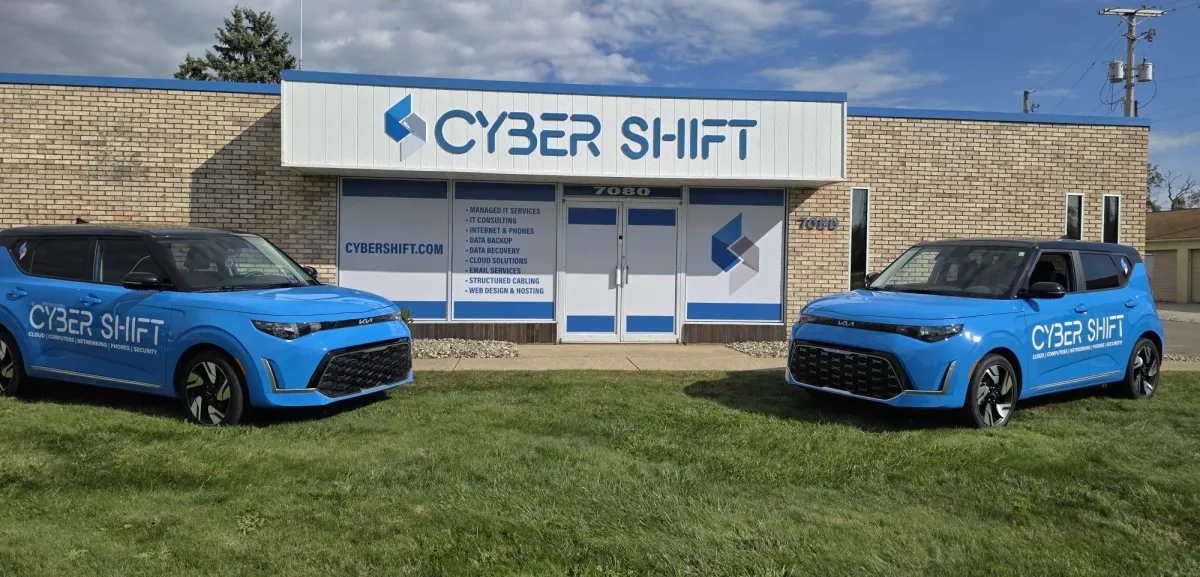
Cyber Shift Technologies service vehicles at the North Canton home base
North Canton home baseBring scattered work back together.

Support from our North Canton team.

When your Cuyahoga Falls team splits time between office and home, work stalls if nobody can find the current file or knows who handles an IT problem. Managed IT gives your files one agreed place, settles which devices are approved and sets a clear escalation path. Summit County is one of three counties our service area is built around.

Cuyahoga Falls businesses

Keep support consistent wherever your people work.

Hybrid work, shared-file ownership and consistent support across office and remote locations.

Cuyahoga Falls provides business resources for established employers and new investment through its community development team. For an office with employees working across locations, the IT priority is often consistency: approved devices, dependable access and a clear help process. Our North Canton team reviews the specific locations, applications and provider responsibilities before agreeing support. A nearby service area does not replace that conversation about scope.

Our North Canton office
7080 Whipple Ave NW
North Canton, OH 44720

330-353-8420 · Meet the people behind your support

Your support plan

Start with the work that keeps getting interrupted.

Three handoffs to fix first, so work stops waiting on the right person.

Find the right file without asking around.

Review shared folders, permissions and document ownership. Decide which platform holds the current record so employees are not passing conflicting copies between email, personal drives and chat.

Plan collaboration

Make remote support predictable.

Identify approved devices and applications, the process for requesting help and who handles a connection problem. Personal equipment and home internet responsibilities need clear boundaries.

Review employee IT support

Remove unnecessary handoffs.

Map one recurring process before adding software or an AI agent. Sometimes clearer ownership or a straightforward automation is enough to reduce repeated copying and checking.

Explore process automation

Client Experiences

IT support, in our clients' words.

Experiences from clients across our region.

5.0
Cyber Shift is a very knowledgeable, professional, and efficient company. We've used them for website development, IT monitoring of all our computers, Google Workspace, web hosting, computer hardware, and more. I can't express how important it was for us to find a company that provides all of these services, and does an excellent job as well. Cyber Shift makes us feel like we're their number one priority. Our company is running better with the support of Cyber Shift. I highly recommend them.
Cindy B., North Canton, OHGoogle Review
5.0
Cyber Shift has been a great asset to our company not just as a managed IT provider but helping us implement new software/hardware, phone system and much more. They are proactive in reviewing upcoming needs and provide outstanding and quick support when needed. Highly recommend John and the whole team to any organization seeking high-quality IT support and solutions.
Matt A., Wadsworth, OHGoogle Review
5.0
Our business has been using Cyber Shift for our IT needs for a couple of years and I cannot recommend them enough. The staff is friendly, prompt, and patient with our staff and equipment.
Justin S., Twinsburg, OHGoogle Review
Read more Google reviews

Before you commit

Questions worth answering before making a change.

Sort these out before another tool, device or provider joins the mix.

Where is the current version?

Shared links can be useful, but people need to know which location is authoritative and who approves external access. Start with a frequently used customer or project file.

Ask before you commit: Can a new employee find the right record without asking three people?

Which device can access business information?

Review account protection, approved equipment and what happens if a device is lost. Agree the boundary between business-managed equipment and personal devices.

Ask before you commit: Who can remove access and how is the incident reported?

Who owns a cross-provider problem?

A phone, application or internet issue can involve more than one vendor. Record escalation contacts and what each provider needs to investigate.

Ask before you commit: Who coordinates the handoff instead of sending the employee back to another help desk?

A practical first conversation

Bring the problem. We will help plan the next step.

You don't need a full map of your systems to start the conversation.

  1. Describe the work.

    Choose one process where people repeatedly search, copy information or wait for access.

  2. Map the dependencies.

    List the work locations, collaboration tools and support providers involved.

  3. Agree a starting point.

    Agree which change to test first and how employees will request help during the transition.

Please keep passwords, confidential documents and detailed network information out of the contact form. We can arrange an appropriate way to review sensitive information.

Cuyahoga Falls IT questions

Know what to expect from your IT support.

Answers for Cuyahoga Falls teams split between the office and home.

Can you support a Cuyahoga Falls office and remote staff?

Yes. We support the office and the people working remotely, starting with the users, approved devices and business applications involved. Your agreement should spell out who supports personal equipment, home internet and specialist applications, so nobody assumes every device or service an employee uses is covered automatically.

Can you help organize shared files and permissions?

Yes. We can review where business files are stored, who owns them and how employees and external contacts receive access. Agree the intended structure before moving information. Permissions, retention needs and the process for removing access should be considered alongside convenience so the new arrangement remains manageable as people change roles.

Does improving a workflow always require an AI agent?

No. Start with the process, the information it uses and the problem you want to solve. Clear ownership, an existing software feature or straightforward automation may be sufficient. AI is one possible tool, and its accuracy, access requirements, operating costs and review needs should be assessed before implementation.

What if the issue belongs to our software or internet vendor?

Support is easier when provider responsibilities are recorded before a problem occurs. We discuss which systems we manage and how external vendors are contacted for issues in their scope. Your agreement should identify the coordination role, required permissions and any work that is separate from routine support coverage.

LET'S MAKE ROOM FOR WHAT'S NEXT

Let's talk through your next IT decision.

Pick one file or handoff your Cuyahoga Falls team keeps chasing, and bring it to a free 30-minute call.

Book a 30-Minute CallStart with the IT checklist

A USEFUL FIRST CONVERSATION

Cyber Shift Technologies

Talk with our team

330-353-8420
CYBER SHIFT TECHNOLOGIESNORTH CANTON, OH

Reviewed by John Wheeler, President / Founder