
Next-Generation Phishing Attacks: Here's What's Different
Next generation phishing attacks use AI to build fake pages for each victim. Learn how Northeast Ohio businesses can stay protected with layered defenses.

· Last updated
Quick answer: Next-generation phishing attacks use AI to build fake login pages on the fly, personalized for each visitor. Because there’s no fixed malicious site to scan and block, traditional detection tools can miss them entirely. Businesses need layered defenses like multi-factor authentication and email filtering, not just employee awareness training.
Most phishing scams still feel a little clumsy. The email has an odd greeting. The link doesn’t match the sender. The logo looks slightly off. For years, training employees to spot those red flags has been one of the go-to defenses.
But that’s changing. And not slowly.
Attackers aren’t just sending better-written emails. They’re changing how the scams are built from the ground up. The result is a category of phishing attack where the usual warning signs simply aren’t there. And that’s a real problem for any business that’s been relying on “just don’t click the wrong thing” as a strategy.
Key Takeaways
- AI is allowing attackers to build phishing pages that are generated fresh for each victim, so there’s no single fake site for security tools to detect and block.
- Future phishing scams won’t rely on obvious spelling mistakes or sloppy design. They’ll look polished, personalized, and completely legitimate.
- The traditional advice of “just spot the red flags” is no longer enough on its own. Modern defenses need to limit the damage even when someone does click.
- Multi-factor authentication, email filtering, and secure browser tools still protect you even when a fake page looks convincing.
- Small and mid-sized businesses in Northeast Ohio are not exempt from these threats. Attackers don’t discriminate by size or location.
What’s Actually Changed About Phishing
For a long time, phishing worked like this: attackers built one fake website, sent a mass email to thousands of people, and waited for a few to fall for it. It was cheap and effective enough to be worth the effort.
That model is still out there. However, a more sophisticated approach is starting to take shape, and it’s worth understanding how it works before it becomes common.
Traditional phishing pages are static. A fake bank login page looks the same for everyone who visits it. That consistency is actually a vulnerability for the attacker. Security tools can find the page, flag its code, and block it. Security researchers can crawl the web looking for known fakes.
The newer approach flips that entirely. Instead of one fixed page, the attack delivers something that builds itself on the fly.
Heads up: Security researchers have demonstrated working examples of AI-assembled phishing pages. While this method isn’t yet widespread, the underlying technology is already in use across other types of attacks. The window between “experimental” and “common” is shorter than most people expect.
How AI-Powered Phishing Pages Work
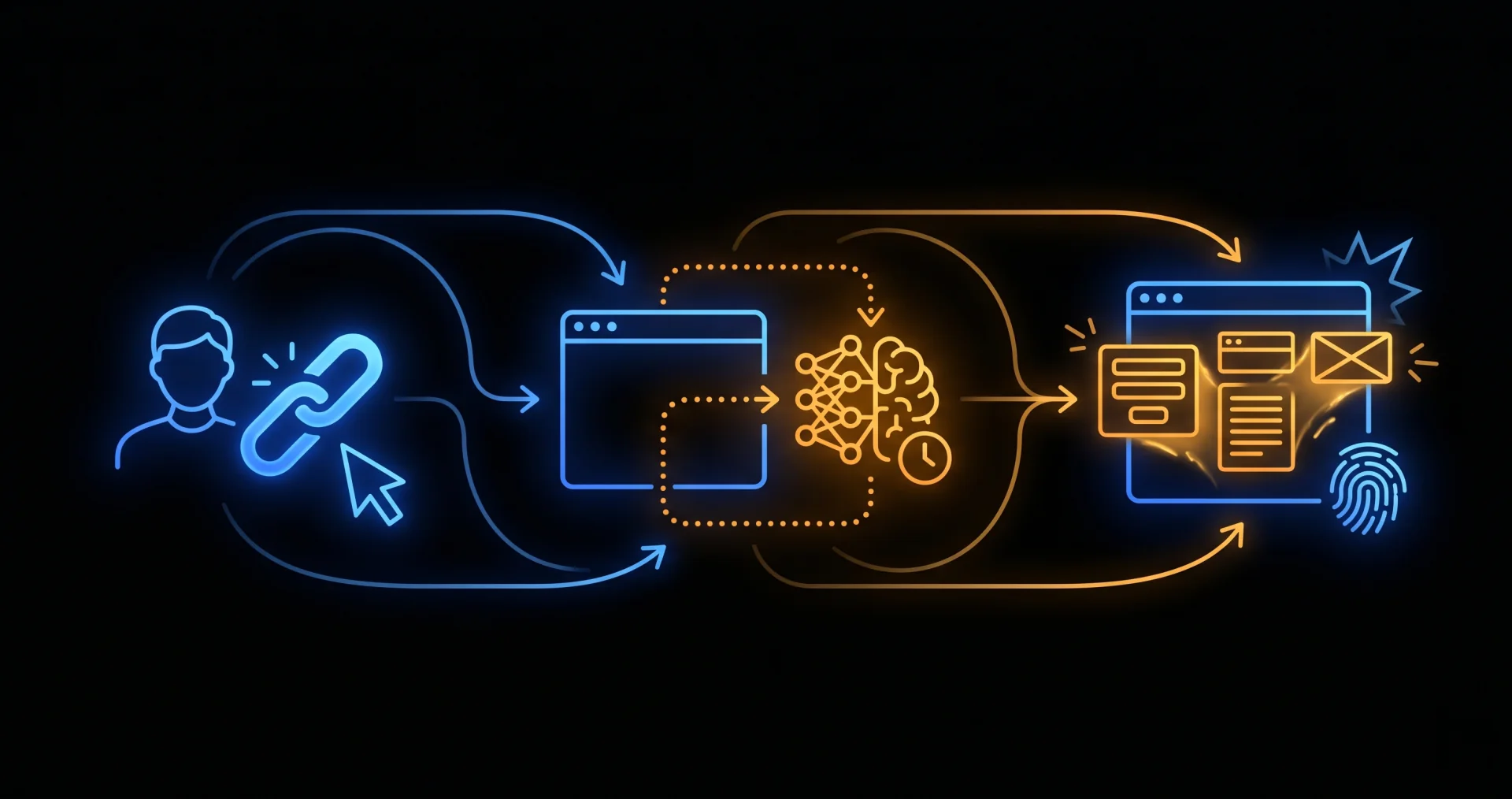
Here’s the basic idea. A victim clicks a link and lands on a webpage. The page looks harmless at first glance. There’s no obvious malicious code sitting in the source.
Once it loads, the page sends a request to a legitimate AI service. That service generates the content. The content then assembles itself and runs directly in the visitor’s browser.
The result is a phishing page that didn’t fully exist until someone opened it. Because the wording, layout, and code can all vary each time, there’s no single fake site for security systems to identify and block.
Furthermore, the page can be shaped by information about the visitor. What device they’re using, what region they’re in, even what service they were searching for before clicking. That makes the fake page look far more convincing than any mass-produced scam.
Why this matters: Traditional email security tools and web filters work by comparing what they see against known threats. An attack that generates unique content for each visitor doesn’t leave a consistent fingerprint to match. That’s what makes this approach different from anything businesses have dealt with before.
Why the Old “Spot the Signs” Advice Falls Short
Most phishing awareness training teaches people to look for specific clues. Typos and bad grammar. Sender addresses that don’t match the company. Urgency designed to make you act before you think. Generic greetings like “Dear Customer.”
Those clues are still valid for a lot of the phishing that’s out there. But they assume the attacker made mistakes. AI doesn’t make those kinds of mistakes.
An AI-generated phishing page can produce clean, professional copy. It can match the tone and layout of the real company it’s impersonating. It can address you by name if the attacker has that data. And it can drop the “urgent tone” cues that people have been trained to flag.
So what does that mean for your team? It means awareness training is still worth doing, but it can’t be the whole plan. Because even a careful, well-trained person can be fooled when the fake looks identical to the real thing.
Real risk for Northeast Ohio businesses: Small and mid-sized businesses in Canton, Akron, and Cleveland are not low-priority targets. Attackers run automated campaigns at scale. Your size doesn’t protect you. In fact, smaller companies often have fewer technical defenses in place, which makes them easier targets.
What Still Works: Your Real Defenses
Here’s the good news. Even when a phishing page looks completely legitimate, several protections still work. And none of them require your employees to be perfect.
The key shift is this: instead of trying to stop every employee from ever clicking the wrong thing, modern security is built to contain the damage when someone does.
Multi-factor authentication (MFA) is the single biggest win. Even if someone enters their password on a fake page, an attacker can’t get into the account without the second factor. MFA doesn’t prevent the click. It prevents the breach.
Email filtering and DNS-layer protection block a large percentage of phishing attempts before they reach anyone’s inbox. They’re not perfect, but they dramatically reduce the volume of threats your team sees.
Secure browser tools and endpoint protection can flag suspicious behavior even when a page looks clean. Some tools watch for unexpected credential-harvesting behavior regardless of what the page looks like visually.
Conditional access policies can limit what someone can do with a compromised account. Even if an attacker gets in, they may not be able to reach sensitive data or move laterally through your systems.
Good to know: Depending on your Microsoft 365 plan, several of these protections may already be included: advanced email threat filtering, MFA through Entra ID and conditional access policies. Many small businesses in Northeast Ohio are already paying for tools like these but haven’t turned them on. That’s a quick win.
What to Do Right Now
You don’t need to wait for AI-generated phishing to become mainstream before taking action. The steps that protect you from this newer threat are the same ones that protect you from everything else out there right now.
6 Practical Steps to Strengthen Your Phishing Defenses
- Turn on MFA everywhere. Email, cloud apps, remote access tools. Start there and expand outward. No single step does more to limit the damage from a stolen password.
- Review your email filtering setup. If you’re on Microsoft 365, make sure its email threat protection is configured properly. Default settings often leave gaps.
- Check your DNS-layer protection. DNS filtering can block known malicious domains before a page even loads.
- Update your phishing awareness training. Teach your team that clean, polished emails can still be fake. The “spot the typo” mindset needs an upgrade.
- Apply conditional access policies. Limit what compromised credentials can actually access. Not every account needs access to everything.
- Test your defenses regularly. Simulated phishing campaigns show you where the gaps are before a real attacker finds them. Many MSPs, including us, can run these for you.
Also, pay attention to the other threat stories circulating right now. Android malware disguised as security apps is stealing PINs and banking details by abusing accessibility permissions. Fake Apple Pay alerts are tricking people into calling scammer phone lines. These aren’t fringe threats. They’re hitting people every week.
The through line is the same: attacks are getting better at looking legitimate. Your defenses need to assume that and plan accordingly.
Find out how well your current defenses would hold up
We work with small and mid-sized businesses across Canton, Akron, and Cleveland to close the gaps that leave them exposed. From a quick configuration review to a full security assessment, we’ll give you a straight picture of where you stand.
Call us: 330-353-8420
Email: info@cybershift.com
Contact form: cybershifttech.com/contact
No pressure. No jargon. Just a straight conversation about where you stand, and what, if anything, needs to change.
About the Author: John Wheeler is a managed IT and Microsoft 365 specialist at Cyber Shift, a trusted IT provider serving small businesses across Northeast Ohio, including Canton, Akron, and Cleveland. He helps local teams get more from the tools they already use, with a focus on practical configuration and day-to-day productivity.
Frequently Asked Questions
What makes next-generation phishing attacks different from regular phishing?
Traditional phishing uses a fixed fake website sent to many people at once. Newer AI-powered attacks generate the phishing page in real time for each visitor, so the content and code change every time. Because there’s no consistent malicious page to scan, standard security tools have a harder time detecting and blocking it.
Can employee training still protect my business against these newer attacks?
Training still matters, but it can’t be your only defense. AI-generated pages can look polished and professional, so the usual visual red flags may not appear. The better approach pairs awareness training with technical controls like MFA, email filtering, and conditional access, so the damage is limited even when someone clicks the wrong link.
Does multi-factor authentication actually stop phishing attacks?
MFA doesn’t stop someone from entering their password on a fake page. However, it does stop the attacker from using that password to access the account, because they won’t have the second factor. That’s why security professionals treat MFA as one of the highest-impact controls available. It’s not perfect, but it’s one of the best single steps you can take.
Are small businesses in Northeast Ohio really targeted by sophisticated phishing attacks?
Yes. Attackers run automated campaigns at scale and don’t filter by company size or geography. Smaller businesses are often targeted precisely because they have fewer technical defenses in place. If you have email accounts, cloud apps, and a bank account, you’re a viable target. Being small or local doesn’t change that.
What Microsoft 365 tools can help protect against phishing?
Depending on the plan, Microsoft 365 can include advanced email threat filtering, multi-factor authentication through Entra ID, conditional access policies, and Safe Links, which checks URLs at the time of click rather than at delivery. Many businesses are already paying for these tools but haven’t fully configured them. A quick review can often find gaps worth closing.
How can I tell if my current phishing defenses are good enough?
The honest answer is that you won’t know until you test. Simulated phishing campaigns send safe fake phishing emails to your team and measure how many people click. That data shows you where training gaps exist. A security assessment can also review your technical controls and identify misconfigured settings before an attacker finds them first.